Game:bit
来自Labplus盛思维基百科
概述
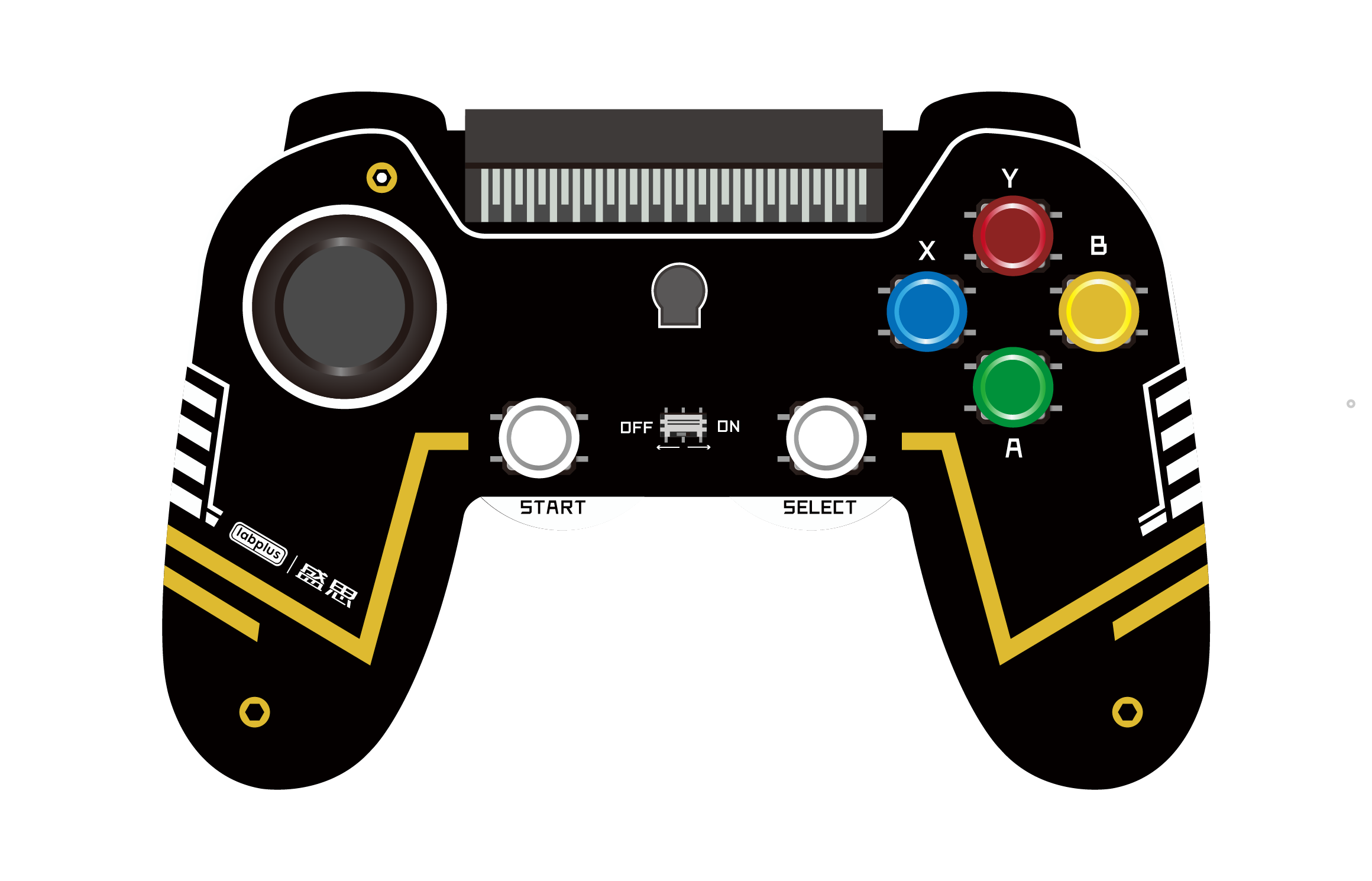
microbit拓展游戏手柄。拥有丰富的输入按键、双轴游戏摇杆、震动马达、无源蜂鸣器。结合microbit可以有多样的玩法,增加microbit编程的趣味性!
技术参数
- 输入电源:3V(2节7号干电池)
- PCI插槽可插入microbit作主控
- 拥有丰富的按键、双轴摇杆、震动马达、无源蜂鸣器
使用教程
| game:bit | 说明 | micro:bit引脚 | Python示例 |
|---|---|---|---|
| 双轴按键游戏摇杆 | 三路模拟输出,输出值分别对应(X,Y)双轴偏移量和Z轴; 按下的输出模拟量800~850,松开输出模拟量1023 |
X轴->P2 Y轴->P1 Z按键->P0 |
获取x轴偏移量: pin2.read_analog() 获取z按键模拟量: pin0.read_analog() |
| Y/X/B/A按键 | 当Y按下按键输出模拟量0~50, 松开输出模拟量1023 当X按下按键输出模拟量200~250, 松开输出模拟量1023 |
P0 | pin0.read_analog() |
| 「START」按键 | 「START」按键连接microbit的BUTTON_A,功能与microbit的A按键功能相同 | BUTTON_A(P5) | button_a.is_pressed()==True #当「START」按键按下 |
| 「SElECT」按键 | 「SElECT」按键连接microbit的BUTTON_B,功能与microbit的B按键功能相同 | BUTTON_B(P11) | button_b.is_pressed()==True #当「SELECT」按键按下 |
| 震动马达 | 输入高电平,触发震动马达,低电平停止震动 | P16 | pin16.write_digital(1) #震动开启 pin16.write_digital(0) #停止震动 |
| 无源蜂鸣器 | 设置频率或音阶,可发出对应频率的电子声音 | P8 | music.pitch(1000,1000,pin8) #蜂鸣器发出1KHz,持续1秒的声音 |
应用示例
无线遥控器
可利用microbit的无线功能,发送game:bit的按键数据。另外一块microbit接收数据后,作出响应。达到无线遥控的功能。可应用在无线遥控手柄的场景上。
- game:bit & micro:bit发送端程序:
from microbit import *
import radio

def getKeyVal():
    key = 0
    btVal = pin0.read_analog()
    if (btVal < 70):
        key = 1    # button Y
    elif (btVal < 270 and btVal > 130):
        key = 2    # button X
    elif (btVal < 470 and btVal > 330):
        key = 3    # button B
    elif (btVal < 670 and btVal > 530):
        key = 4    # button A
    elif (btVal < 870 and btVal > 730):
        key = 5    # rocker button
    if button_a.is_pressed():
        key = 6    # button start
    if button_b.is_pressed():
        key = 7    # button select
    return key

radio.config(length=32, queue=3, channel=7, power=0, data_rate=radio.RATE_1MBIT)
radio.on()
while True:
    sendBuff = [0,0,0,0,0,0]
    tmp = pin2.read_analog()    # axix x
    sendBuff[0] = tmp & 0xff
    sendBuff[1] = (tmp >> 8) & 0xff
    tmp = pin1.read_analog()  # axis y
    sendBuff[2] = tmp & 0xff
    sendBuff[3] = (tmp >> 8) & 0xff
    tmp = getKeyVal()           # button val
    sendBuff[4] = tmp & 0xff
    sendBuff[5] = (tmp >> 8) & 0xff
    radio.send_bytes(bytearray(sendBuff))
    #print(sendBuff)
    sleep(50)
- micro:bit接收端程序:
from microbit import *
import radio

radio.config(length=32, queue=3, channel=7, power=0, data_rate=radio.RATE_1MBIT)
radio.on()
while True:
    tmp = radio.receive_bytes()
    if (tmp != None):
        x = (tmp[1]<<8)|tmp[0]
        y = (tmp[3]<<8)|tmp[2]
        key = (tmp[5]<<8)|tmp[4]
        #print(x)
        #print(y)
        #print(key)
走迷宫
game:bit手柄和micro:bit的led屏互动的小游戏!通过game:bit的摇杆控制来行走迷宫,趣味十足!
gamebit_maze例程下载
- 以下迷宫图,从黄色点启始,蓝色点为出口。也可通过修改maze[]数组,设计自己的迷宫图!

"""
A simple maze program.  You are the flashing dot and can walk around
using the accelerometer.
"""

import microbit
from microbit import *
import music

d = microbit.display

# the maze data, as binary numbers (outside walls are added automatically)
maze = [
    0b1111111111111111,
    0b0011110101001001,
    0b1000010101011101,
    0b1110110100000000,
    0b1100000111110111,
    0b1001011101000001,
    0b1011010001011101,
    0b1010000100000101,
    0b1000111111101101,
    0b1010110001000111,
    0b1010000100010001,
    0b1010101111010111,
    0b1010101101010001,
    0b1010100100011101,
    0b1000110111011001,
    0b1111111111111011,
]
def getRockerVal():
    Dir = 0
    val1 = pin1.read_analog()
    val2 = pin2.read_analog()
    if val1 > 750:
        Dir = 1 #up
    elif val1 < 250:
        Dir = 2 #down
    elif val2 < 250:
        Dir = 3 #left
    elif val2 > 750:
        Dir = 4 #right
    print(Dir)
    return Dir

def get_maze(x, y):
    if 0 <= x < 16 and 0 <= y < 16:
        return (maze[y] >> (15 - x)) & 1
    else:
        return 1

def draw(x, y, tick):
    img = microbit.Image(5,5)
    for j in range(5):
        for i in range(5):
            img.set_pixel(i, j, get_maze(x + i - 2, y + j - 2)*5)

    # draw the player, flashing
    img.set_pixel(2, 2, (tick & 1)*4+5)
    d.show(img)

def main():
    x = 0
    y = 1
    tick = 0
    while True:
        dir = getRockerVal()
        tick += 1
        if tick == 4:
            # walk around, with collision detection
            tick = 0
            if dir == 4 and get_maze(x + 1, y) == 0:
                x += 1
            elif dir == 3 and get_maze(x - 1, y) == 0:
                x -= 1
            elif dir == 2 and get_maze(x, y + 1) == 0:
                y += 1
            elif dir == 1 and get_maze(x, y - 1) == 0:
                y -= 1
            x = min(15, max(0, x))
            y = min(15, max(0, y))

        # draw the maze
        draw(x, y, tick)
        microbit.sleep(50)

        if (x == 15 and y == 3) or (x==13 and y==15):
            music.play(music.NYAN, pin = pin8)
            x = 0
            y = 1
            tick = 0
main()