Bot:bit

目录
概述
bot:bit人形机器人是一款可以编程控制的人形机器人,支持Mpython图形化编程和Python代码编程,简单易学,通过编程可拓展人的空间思维空间能力。机器人具有多种工作形态,一是装4自由度舵机作为手臂,加上2路电机作为轮子,自由移动的同时双手可灵活操作;二是装有4自由度舵机作为双腿、实现自由行走、避障 循迹。
技术参数
- 动作灵活:全身拥有8个动作关节,拟人造型,实现动作舞蹈,身手灵活。
- 无线遥控:2.4GHz射频传输模块和蓝牙模块,可实现遥控格斗运动,欢乐无穷。
- 内置加速度计
- 测距避障:内置的高精度超声波模块,能快速返回测量信息、走迷宫、越野的多种任务挑战
- 循迹:采用5对红外收发管
- 高续航:3节并联14500锂电池,可循环充电,支持课堂教学应用。


引脚定义/接口说明
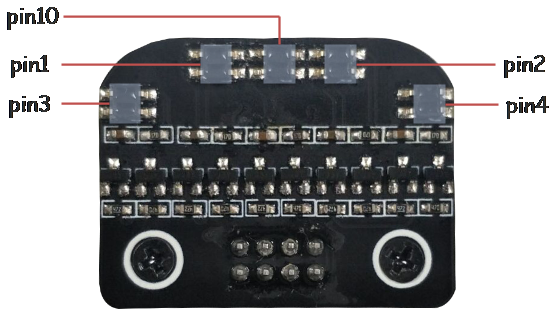
|
| bot:bit循迹板引脚定义 |
使用教程
结构组装
bot:bit有以下两种形态,外壳结构部分的组装详见组装说明!
 |
注意: | 在安装舵盘前,请先烧录"组装程序.hex",使舵机角度归零后再按要求按装舵盘! |
 |
File:Bobit组装程序.rar |
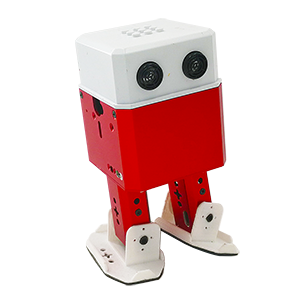
行走式机器人
4自由度舵机作为双腿、实现自由行走
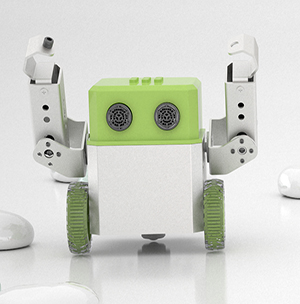
轮式机器人
4自由度舵机作为手臂,加上2路电机作为轮子,自由移动的同时双手可灵活操作
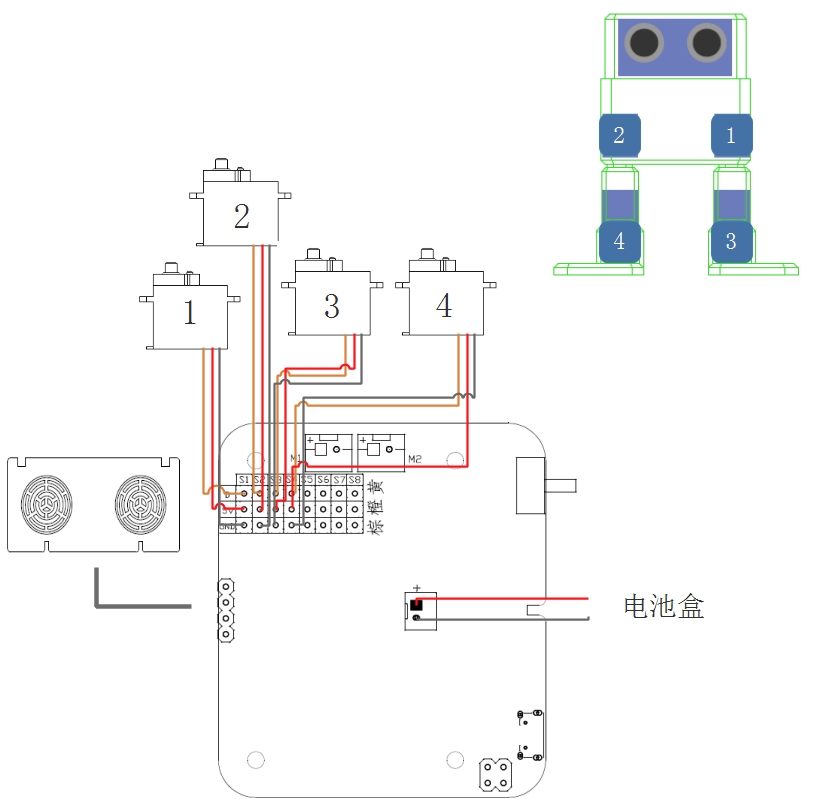
连接示意图
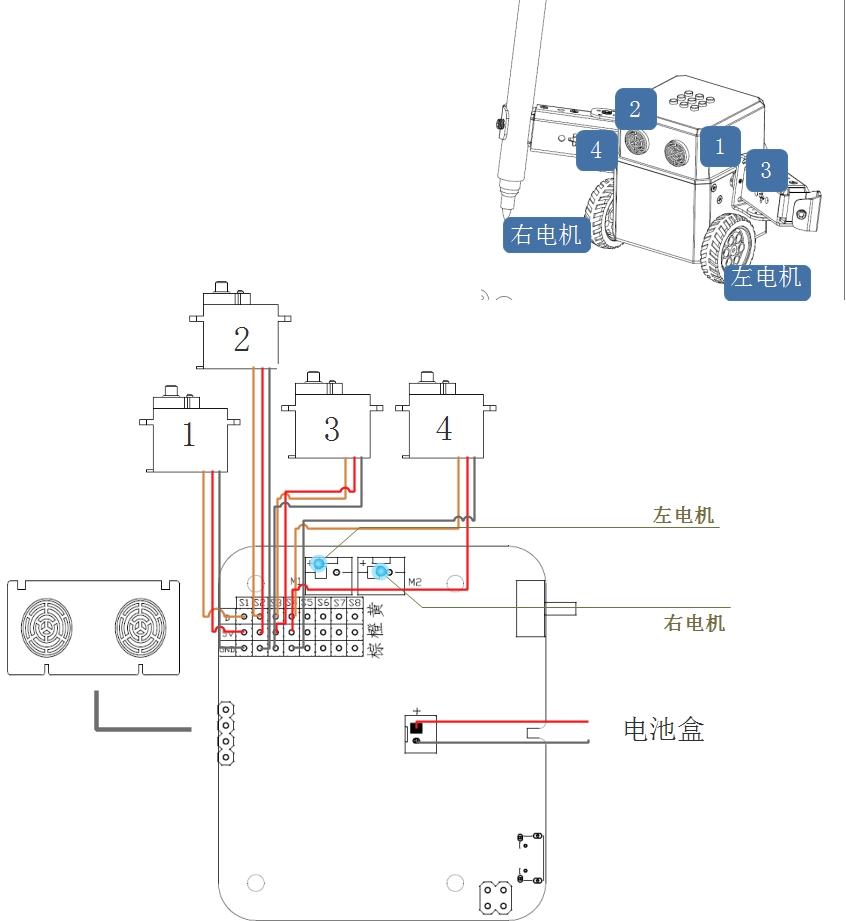
根据不同bot:bit形态,按示意图将手或脚部的舵机、循迹板、直流电机、电池等连接至主板上
行走式机器人硬件连接
轮式机器人硬件连接
程序下载快速指南
Step1.m:python编程软件安装:
双击mpythonSetup.exe按提示安装编程程序。进入官网下载 ( http://labplus.cn/index.php/product/download )
系统要求:windows7/windows8/windows10,32/64位;windows XP。
Step2.Micro:bit 串口驱动安装:双击mbedWinSerial.exe,按提示安装串口驱动。如需要USB串口打印数据须安装该驱动,不需要可跳过此步骤。
- 进入官网下载 ( http://labplus.cn/index.php/product/download )
- 进入官网下载 ( http://labplus.cn/index.php/product/download )

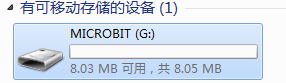
Step3.硬件识别:USB接口连接至电脑,打开电源开关。电脑将自动识别到可移动存储设备MICROBIT。
Step4. 程序设计:打开mpython编程软件,根据需要选择图形化编程或python代码编程方式来完成程序。点击软件指令区,选择对应指令进行编程,更方便快速的设计程序。也可点击菜单栏“模块化”,可切换至代码编程。
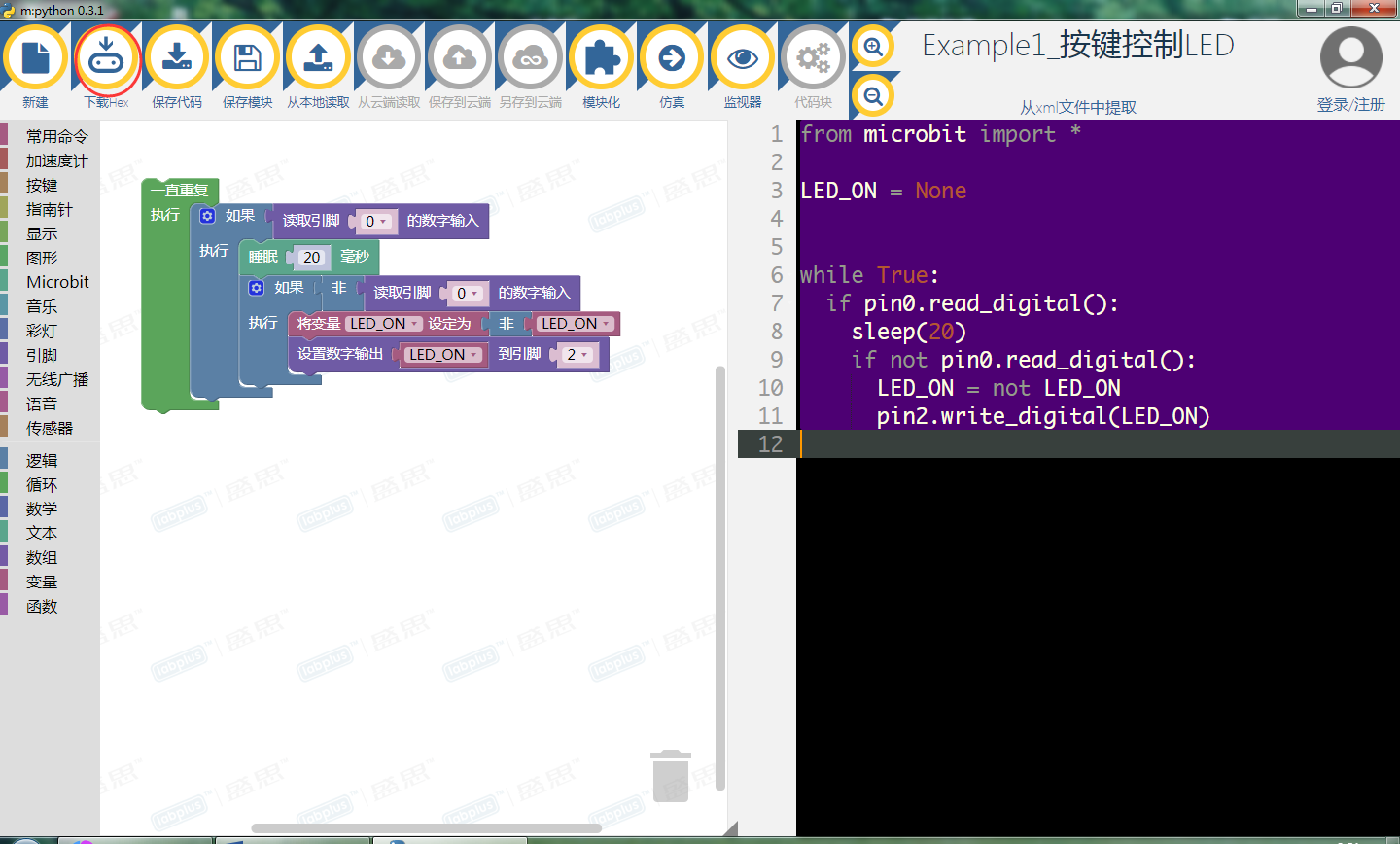
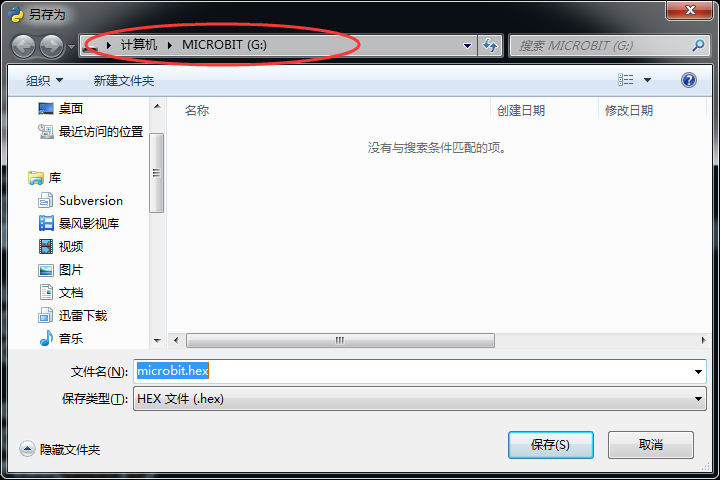
Step5. 程序完成后,点击 ,下载程序并保存到microbit可移动盘上 ,待下载指示灯闪烁完毕后,说明程序下载成功。
更多m:python编程软件操作说明可查看 http://wiki.labplus.cn/index.php?title=Mpython
API 应用程序编程接口
| 类别 | 函数名 | 说明 | |||
|---|---|---|---|---|---|
| 脚部控制 | walking(steps,time, direction) | 函数功能:向前、后行走 参数:
| |||
| moonwalker(steps,time,h,direction) | 函数功能:迈克尔杰克逊的太空漫步 参数:
| ||||
| crusaito(steps,time,h,direction) | 函数功能:滑步 参数:
| ||||
| flapping(steps,time,h,direction) | 函数功能:八字摇摆 参数:
| ||||
| jump(time) | 函数功能:跳跃 参数:
| ||||
| turn(steps,time,h,direction) | 函数功能:向左、右转向 参数:
| ||||
| 手部/脚部舵机控制 | setServo(number,angle) | 函数功能:S1-S4,4路的舵机驱动 参数:
| |||
| 音乐播放 | music.play(music) | 函数功能:播放曲目 参数:
[详细的microbit曲目和更多的Music用法,请查阅 BBC micro:bit MicroPython Music | |||
| 轮子控制 | motion(leftSpeed, rightSpeed) | 函数功能:轮式机器人两轮的控制 参数:
| |||
| 超声波 | distance() | 函数功能:返回超声波测距 | |||
| RGB灯控制 | setRGB(cmd,r,g,b) | 函数功能:控制RGB灯(RGB颜色模型) 参数:
| |||
| setHSV(cmd,h,s,v) | 函数功能:控制RGB灯(HSV颜色模型) 参数:
| ||||
| 循迹 | PIDtracking(kp,kd,trackSpeed) | 函数功能:PID算法循迹 参数:
|
应用示例
行走式Python编程示例
跳舞机器人
from microbit import *
import music
import math
servo_pos = bytearray([0, 0x05, 0xDC, 0x05, 0xDC, 0x05, 0xDC, 0x05, 0xDC])
def setServo(servo, angle):
    "set the servo angel"
    a = (1.5 + angle/90) * 1000
    servo_pos[servo*2 + 1] = int(a / 256)
    servo_pos[servo*2 + 2] = int(a % 256)
def updatePosition():
    servo_pos[0] = 0
    i2c.write(0x2A, servo_pos)
def getDistance():
    i2c.write(0x0b, bytearray([1]))
    temp=i2c.read(0x0B,2)
    dis =(temp[0]+temp[1]*256)/10
    return dis
inc = 0
phase_start=[0, 0, 0, 0]
phase=[0, 0, 0, 0]
offset=[0, 0, 0, 0]
amplitude=[0, 0, 0, 0]
t = 0
def refresh():
    global t, phase, inc, amplitude, phase_start
    if (running_time() - t) > 50:
        t = running_time()
        for i in range(0, 4):
            pos = round(amplitude[i]*math.sin(phase[i] + phase_start[i]) + offset[i])
            setServo(i, pos)
            phase[i] = phase[i] + inc
        updatePosition()
def action(A, O, DIFF, T, steps):
    global inc, amplitude, phase_start, offset
    t2 = 0
    inc = 2*math.pi/(T/50)
    for i in range(0, 4):
        amplitude[i] = A[i]
        phase_start[i] = DIFF[i]
        offset[i] = O[i]
    cycle = int(steps)
    t2 = running_time() + T*cycle
    while (running_time() < t2):
        refresh()
    for i in range(0, 4):
        amplitude[i] = A[i]
        phase_start[i] = DIFF[i]
        offset[i] = O[i]
    # move the servo
    t2 = running_time() + T*(steps - cycle)
    while (running_time() < t2):
        refresh()
def walking(steps, T=1000, dir=1):
    AMP = (30, 30, 20, 20)
    OFFSET = (0, 0, 4, -4)
    DIFF = (0, 0, -math.pi/2 * dir, -math.pi/2 * dir)
    action(AMP, OFFSET, DIFF, T, steps)
    return
def turn(steps, T=2000, dir=1):
    OFFSET = [0, 0, 4, -4]
    DIFF = (0, 0, -math.pi/2 * dir, -math.pi/2 * dir)
    if dir == 1:
        AMP = (30, 10, 20, 20)
    else:
        AMP = (10, 30, 20, 20)
    action(AMP, OFFSET, DIFF, T, steps)
    return
def moonwalker(steps, T=900, h=20, dir=1):
    'Moonwalker. Otto moves like Michael Jackson'
    AMP = [0, 0, h, h]
    OFFSET = [0, 0, h/2 + 2, -h/2 -2]
    DIFF = [0, 0, math.pi/180*dir*-90, math.pi/180*dir*-150]
    action(AMP, OFFSET, DIFF, T, steps)
    return
def crusaito(steps, T, h, dir):
    AMP = [25, 25, h, h]
    OFFSET = [0, 0, h/2+ 4, -h/2 - 4]
    DIFF = [90, 90, 0, math.pi/180*dir*-60]
    action(AMP, OFFSET, DIFF, T, steps)
def flapping(steps, T, h, dir):
    AMP = [12, 12, h, h]
    OFFSET = [0, 0, h-10, -h+10]
    DIFF = [0, math.pi/180*180, math.pi/180*dir*-90, math.pi/180*dir*90]
    action(AMP, OFFSET, DIFF, T, steps)
    return
servo_position = [0, 0, 0, 0]
servo_increment = [0, 0, 0, 0]
def moveServos(time, servo_target):
    if time > 20:
        for i in range(0, 4):
            servo_increment[i] = (servo_target[i] - servo_position[i])/(time/20)
        final_time = running_time() + time;
        iteration = 1
        while running_time() < final_time:
            partial_time = running_time()+20
            for i in range(0, 4):
                setServo(i, servo_position[i]+iteration*servo_increment[i])
            updatePosition()
            while running_time() < partial_time:
                pass
            iteration = iteration+1
    else:
        for i in range(0, 4):
            setServo(i, servo_target[i])
        updatePosition()
    for i in range(0, 4):
        servo_position[i] = servo_target[i]
    return
def jump(T):
    up = [0, 0, 45, -45]
    moveServos(T, up)
    down = [0, 0, 0, 0]
    moveServos(T, down)
    return
def home():
    for i in range(0, 4):
        setServo(i, 0)
        servo_position[i] = 0
    updatePosition()

display.off()
home()
while True:
    walking(5, 1500, 1)
    walking(5, 1500, -1)
    music.play(music.BA_DING)
    moonwalker(5, 1000, 25, 1)
    moonwalker(5, 1000, 25, -1)
    music.play(music.BADDY)
    crusaito(8, 1000, 15, 1)
    crusaito(8, 1000, 15, -1)
    crusaito(4, 2000, 15, 1)
    crusaito(4, 2000, 15, -1)
    music.play(music.NYAN)
    flapping(5, 1500, 15, 1)
    flapping(5, 1500, 15, -1)
    music.play(music.BIRTHDAY)
轮式机器人Python编程示例
遥控轮式机器人
程序说明:需要下载有两个程序,一个是micro:bit作为遥控程序,另一个为bot:bit执行动作程序。micro:bit实时发送xyz加速度数据操控bot:bit轮子行走,按下「A」按键+xyz加速度操控两臂动作。
* micro:bit遥控程序
from microbit import *
import radio
radio.on()
radio.config(length=8, queue=3, channel=79, power=7,
             address=0x44773311, group=0x1B, data_rate=radio.RATE_250KBIT)

msg = bytearray(8)
x = 0
y = 0
z = 0
a = 0
while True:
    x = accelerometer.get_x()
    y = accelerometer.get_y()
    z = accelerometer.get_z()
    if button_a.is_pressed():
        a = a | 0x01
    else:
        a = a & 0xFE
    if button_b.is_pressed():
        a = a | 0x02
    else:
        a = a & 0xFD
    x = x + 10000;
    msg[0] = int(x / 256)
    msg[1] = x % 256
    y = y + 10000;
    msg[2] = int(y / 256)
    msg[3] = y % 256
    z = z + 10000;
    msg[4] = int(z / 256)
    msg[5] = z % 256
    msg[6] = int(a / 256)
    msg[7] = a % 256
    radio.send_bytes(msg)
    sleep(100)
* 轮式机器人执行程序
# -*- coding: utf-8 -*-
from microbit import *
import radio
import math

motor_pwm = bytearray([8, 0x00, 0x00, 0x00, 0x00, 0x00, 0x00, 0x00, 0x00])
servo_pos = bytearray([0, 0x05, 0xDC, 0x05, 0xDC, 0x05, 0xDC, 0x05, 0xDC])

'''
motor_pwm.ch1 = M1.A
motor_pwm.ch2 = M1.B
motor_pwm.ch3 = M2.A
motor_pwm.ch4 = M2.B
'''


def motion(leftSpeed, rightSpeed):
    if leftSpeed > 2000:
        leftSpeed = 2000
    if leftSpeed < -2000:
        leftSpeed = -2000
    if leftSpeed == 0:
        motor_pwm[1] = 0
        motor_pwm[2] = 0
        motor_pwm[3] = 0
        motor_pwm[4] = 0
    if leftSpeed > 0:
        motor_pwm[1] = int(leftSpeed / 256)
        motor_pwm[2] = int(leftSpeed % 256)
        motor_pwm[3] = 0
        motor_pwm[4] = 0
    if leftSpeed < 0:
        leftSpeed = -leftSpeed
        motor_pwm[1] = 0
        motor_pwm[2] = 0
        motor_pwm[3] = int(leftSpeed / 256)
        motor_pwm[4] = int(leftSpeed % 256)
    if rightSpeed > 2000:
        rightSpeed = 2000
    if rightSpeed < -2000:
        rightSpeed = -2000
    if rightSpeed == 0:
        motor_pwm[5] = 0
        motor_pwm[6] = 0
        motor_pwm[7] = 0
        motor_pwm[8] = 0
    if rightSpeed > 0:
        motor_pwm[5] = 0
        motor_pwm[6] = 0
        motor_pwm[7] = int(rightSpeed / 256)
        motor_pwm[8] = int(rightSpeed % 256)
    if rightSpeed < 0:
        rightSpeed = -rightSpeed
        motor_pwm[5] = int(rightSpeed / 256)
        motor_pwm[6] = int(rightSpeed % 256)
        motor_pwm[7] = 0
        motor_pwm[8] = 0
    i2c.write(0x2A, motor_pwm)


def setServo(servo, angle):
    "set the servo angel"
    a = (1.5 + angle/90) * 1000
    servo_pos[servo*2 + 1] = int(a / 256)
    servo_pos[servo*2 + 2] = int(a % 256)


def updatePosition():
    servo_pos[0] = 0
    i2c.write(0x2A, servo_pos)


def getDistance():
    i2c.write(0x0b, bytearray([1]))
    temp = i2c.read(0x0B, 2)
    dis = (temp[0]+temp[1]*256)/10
    return dis


# application
display.off()
motion(0, 0)

radio.on()
radio.config(length=8, queue=20, channel=79, power=7,
             address=0x44773311, group=0x1B, data_rate=radio.RATE_250KBIT)
x = 0
y = 0
z = 0
a = 0
left = 0
right = 0
while True:
    # print("running")
    msg = bytes(8)
    msg = radio.receive_bytes()
    if msg is not None:
        x = msg[0]*256 + msg[1]
        x = x - 10000
        y = msg[2]*256 + msg[3]
        y = y - 10000
        z = msg[4]*256 + msg[5]
        z = z - 10000
        a = msg[6]*256 + msg[7]
        if a == 0:
            left = int((y + x) )
            right = int((y - x))
            #print('left = ', left)
            #print('right = ', right)
            motion(-right, -left)
        if (a & 0x03) != 0:
            motion(0, 0)
            y = min(max(-1000, y), 1000)
            x = min(max(-1000, x), 1000)
            sv = math.asin(y/1000)*180/math.pi
            sh = math.asin(x/1000)*180/math.pi
            sv = min(max(-45, sv), 45)
            sh = min(max(-45, sh), 45)
            if (a & 0x01) != 0:
                setServo(0, -sv)
                setServo(2, -sh)
            if (a & 0x02) != 0:
                setServo(1, sv)
                setServo(3, sh)
            updatePosition()
循迹机器人
| |
注意 | 只有V2.1版本机器人才支持循迹功能 |
程序使用说明:打开电源,将机器人放置在循迹黑线的中间位置。上电后,机器人原地逆时针旋转,进行红外循迹的黑白校准。校准完成后,机器人进入循迹模式。
 # -*- coding: utf-8 -*-
from microbit import *
import music
import math
import radio

motor_pwm = bytearray([8, 0x00, 0x00, 0x00, 0x00, 0x00, 0x00, 0x00, 0x00])
servo_pos = bytearray([0, 0x05, 0xDC, 0x05, 0xDC, 0x05, 0xDC, 0x05, 0xDC])

# motion functions
def motion(leftSpeed, rightSpeed):
    if leftSpeed > 2000:
        leftSpeed = 2000
    if leftSpeed < -2000:
        leftSpeed = -2000
    if leftSpeed == 0:
        motor_pwm[1] = 0
        motor_pwm[2] = 0
        motor_pwm[3] = 0
        motor_pwm[4] = 0
    if leftSpeed > 0:
        motor_pwm[1] = int(leftSpeed / 256)
        motor_pwm[2] = int(leftSpeed % 256)
        motor_pwm[3] = 0
        motor_pwm[4] = 0
    if leftSpeed < 0:
        leftSpeed = -leftSpeed
        motor_pwm[1] = 0
        motor_pwm[2] = 0
        motor_pwm[3] = int(leftSpeed / 256)
        motor_pwm[4] = int(leftSpeed % 256)
    if rightSpeed > 2000:
        rightSpeed = 2000
    if rightSpeed < -2000:
        rightSpeed = -2000
    if rightSpeed == 0:
        motor_pwm[5] = 0
        motor_pwm[6] = 0
        motor_pwm[7] = 0
        motor_pwm[8] = 0
    if rightSpeed > 0:
        motor_pwm[5] = 0
        motor_pwm[6] = 0
        motor_pwm[7] = int(rightSpeed / 256)
        motor_pwm[8] = int(rightSpeed % 256)
    if rightSpeed < 0:
        rightSpeed = -rightSpeed
        motor_pwm[5] = int(rightSpeed / 256)
        motor_pwm[6] = int(rightSpeed % 256)
        motor_pwm[7] = 0
        motor_pwm[8] = 0
    i2c.write(0x2A, motor_pwm)


# servo functions
def setServo(servo, angle):
    "set the servo angel"
    a = (1.5 + angle/90) * 1000
    servo_pos[servo*2 + 1] = int(a / 256)
    servo_pos[servo*2 + 2] = int(a % 256)


def updatePosition():
    servo_pos[0] = 0
    try:
        i2c.write(0x2A, servo_pos)
    except:
        print("i2c error")

def BatteryLevel():
    return i2c.read(0x2A, 1)[0]

def distance():
    i2c.write(0x0b, bytearray([1]))
    sleep(2)
    temp=i2c.read(0x0b,2)
    distanceCM=(temp[0]+temp[1]*256)/10
    return distanceCM

def setRGB(cmd,r,g,b): #cmd: 2 leftLed 3: rightLed r,g,b range:0-255
    i2c.write(0x0b,bytearray([cmd,r,g,b]))
    sleep(1)

def setHSV(cmd,h,s,v): #cmd: 4 leftLed 5: rightLed h range:0-360 s v range:0-1
    _h1 = h%256
    _h2 = h//256
    _s = int(s*100)
    _v = int(v*100)
    i2c.write(0x0b,bytearray([cmd,_h1,_h2,_s,_v]))
    sleep(1)

sensor_min = [1024, 1024, 1024, 1024, 1024]
sensor_max = [0, 0, 0, 0, 0]
sensor = [0, 0, 0, 0, 0]
sensor_pin = (pin3, pin1, pin10, pin2, pin4)
# calibration
def Calibrate():
    global sensor_min, sensor_max, sensor,sensor_pin
    motion(-1000, 1000)
    t = running_time()
    while (running_time() - t) < 5000:
        for i in range(5):
            sensor[i] = sensor_pin[i].read_analog()
            sensor_min[i] = min(sensor[i], sensor_min[i])
            sensor_max[i] = max(sensor[i], sensor_max[i])
    motion(0, 0)
    print("sensors min value:%d,%d,%d,%d,%d" % \
         (sensor_min[0], sensor_min[1], sensor_min[2], sensor_min[3], sensor_min[4]))
    print("sensors max value:%d,%d,%d,%d,%d" % \
         (sensor_max[0], sensor_max[1], sensor_max[2], sensor_max[3], sensor_max[4]))

def ReadLineSensor():
    global sensor_min, sensor_max, sensor,sensor_pin
    for i in range(5):
        sensor[i] = sensor_pin[i].read_analog()
        sensor[i] = round((sensor[i] - sensor_min[i]) / (sensor_max[i] - sensor_min[i]) * 1000)

    sum = sensor[0] + sensor[1] + sensor[2] + sensor[3] + sensor[4]
    if sum <= 0:
        return 0
    else:
        return (sensor[0] + sensor[1] * 1000 + sensor[2] * 2000 + sensor[3] * 3000 + sensor[4]*4000) / sum

def PIDtracking(kp,kd,trackSpeed):
    global pre_line_pos
    line_pos = ReadLineSensor() - 2000
    correction = kp * line_pos + kd * (line_pos - pre_line_pos)
    pre_line_pos = line_pos
    print('correction:',correction)
    if correction > 0:
        motion(trackSpeed - correction, trackSpeed)
    else:
        motion(trackSpeed, trackSpeed + correction)

# application
t=0
display.off()
motion(0, 0)
pin3.read_digital()
pin4.read_digital()
pin10.read_digital()
pin3.set_pull(pin3.NO_PULL)
pin4.set_pull(pin4.NO_PULL)
pin10.set_pull(pin10.NO_PULL)
setServo(0,-45)
setServo(2,-45)
setServo(1,45)
setServo(3,45)
updatePosition()
Calibrate()
#kp = float(input('kp=:'))
#kd = float(input('kd=:'))
pre_line_pos = ReadLineSensor() - 2000
while True:
    for i in range(360):
        setHSV(4,i,1.0,1.0)
        setHSV(5,i,1.0,1.0)
        PIDtracking(1.8,5,1200)
        sleep(10)
版本历史记录
| Version | Date | 新增/删除/修复 |
|---|---|---|
| V2.1 | 2018/07/07 | 增加循迹功能超声波板 增加RGB灯功能和优化超声波电路 由USB串口改为蓝牙串口 锂电池由2节改为3节并联,容量更大 |
| V1.2 |