1602 LCD
来自Labplus盛思维基百科
概述
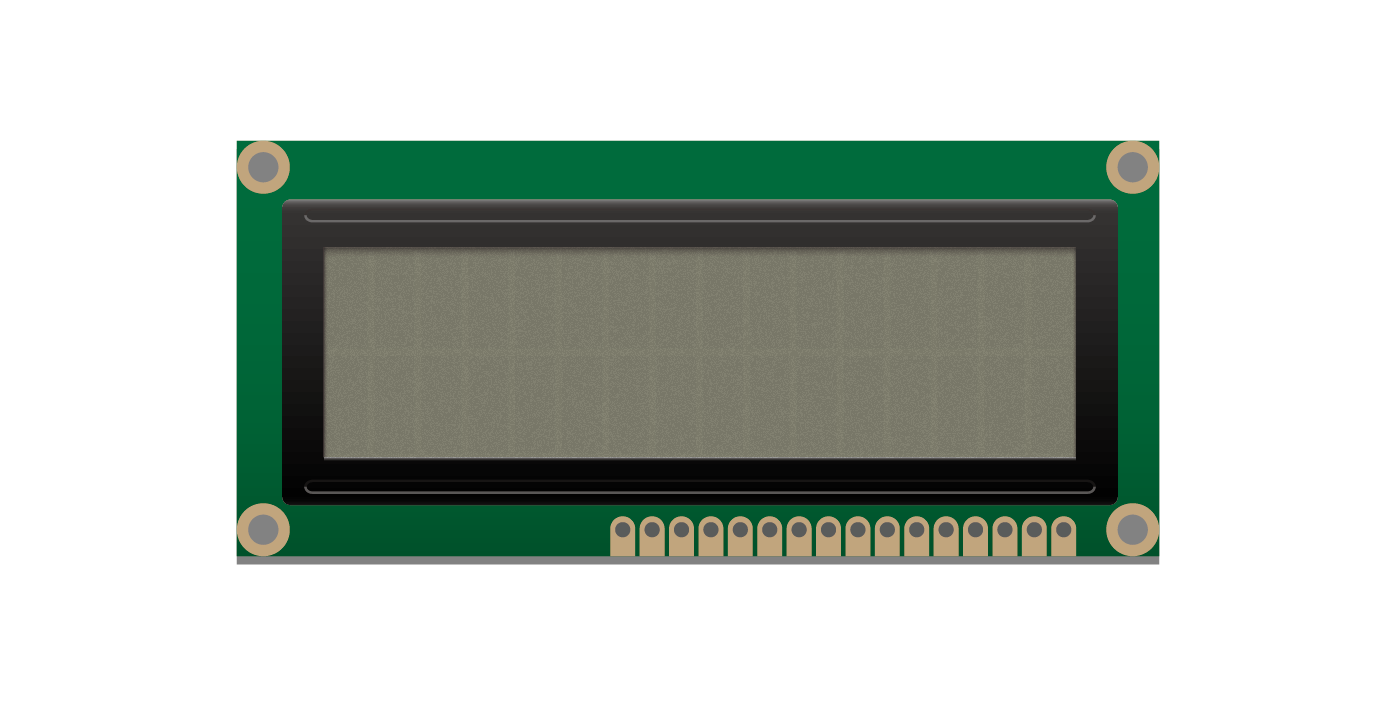
16x2液晶显示字符模块,可用于显示字母、数字、字符等。I2C LCD1602液晶模块可以显示2行,每行16个字符。
对于初学者来说,不必为繁琐复杂液晶驱动电路连线而头疼了,这款LCD扩展板将电路简化,使用相关文档中的库文件,您只需使用几行简单控制代码便能完成LCD控制显示的功能。背面的电位器还能提供你调节液晶显示器对比度的功能。
技术参数
- 工作电压:VCC 3.3-5V
- I2C数字信号输出
- 背光:蓝色,白色字符
- 可调节对比度
- 模块尺寸:80x36x18.6mm
引脚定义
| VCC | 电源 |
| SDA | I2C数据 |
| SCL | I2C时钟 |
| GND | 地 |
使用教程
Arduino示例
//程序功能:显示"hello,world和时间(S)//
/*
  LiquidCrystal Library - Hello World

 Demonstrates the use a 16x2 LCD display.  The LiquidCrystal
 library works with all LCD displays that are compatible with the
 Hitachi HD44780 driver. There are many of them out there, and you
 can usually tell them by the 16-pin interface.

 This sketch prints "Hello World!" to the LCD
 and shows the time.

  The circuit:
 * LCD RS pin to digital pin 12
 * LCD Enable pin to digital pin 11
 * LCD D4 pin to digital pin 5
 * LCD D5 pin to digital pin 4
 * LCD D6 pin to digital pin 3
 * LCD D7 pin to digital pin 2
 * LCD R/W pin to ground
 * LCD VSS pin to ground
 * LCD VCC pin to 5V
 * 10K resistor:
 * ends to +5V and ground
 * wiper to LCD VO pin (pin 3)

 Library originally added 18 Apr 2008
 by David A. Mellis
 library modified 5 Jul 2009
 by Limor Fried (http://www.ladyada.net)
 example added 9 Jul 2009
 by Tom Igoe
 modified 22 Nov 2010
 by Tom Igoe

 This example code is in the public domain.

 http://www.arduino.cc/en/Tutorial/LiquidCrystal
 */

// include the library code:
#include <LCD1602.h>
#include <Wire.h>

// initialize the library with the numbers of the interface pins
LiquidCrystal lcd;

void setup() {
  // set up the LCD's number of columns and rows:
  Wire.begin();
  lcd.begin(16, 2);
  // Print a message to the LCD.
  lcd.print("hello, world!");
}

void loop() {
  // set the cursor to column 0, line 1
  // (note: line 1 is the second row, since counting begins with 0):
  lcd.setCursor(0, 1);
  // print the number of seconds since reset:
  lcd.print(millis() / 1000);
}
MicroPython示例
from microbit import *
# commands
LCD_CLEARDISPLAY = 0x01
LCD_RETURNHOME = 0x02
LCD_ENTRYMODESET = 0x04
LCD_DISPLAYCONTROL = 0x08
LCD_CURSORSHIFT = 0x10
LCD_FUNCTIONSET = 0x20
LCD_SETCGRAMADDR = 0x40
LCD_SETDDRAMADDR = 0x80
# flags for display entry mode
LCD_ENTRYRIGHT = 0x00
LCD_ENTRYLEFT = 0x02
LCD_ENTRYSHIFTINCREMENT = 0x01
LCD_ENTRYSHIFTDECREMENT = 0x00
#flags for display on/off control
LCD_DISPLAYON = 0x04
LCD_DISPLAYOFF = 0x00
LCD_CURSORON = 0x02
LCD_CURSOROFF = 0x00
LCD_BLINKON = 0x01
LCD_BLINKOFF = 0x00
#flags for display/cursor shift
LCD_DISPLAYMOVE = 0x08
LCD_CURSORMOVE = 0x00
LCD_MOVERIGHT = 0x04
LCD_MOVELEFT = 0x00
#flags for function set
LCD_8BITMODE = 0x10
LCD_4BITMODE = 0x00
LCD_2LINE = 0x08
LCD_1LINE = 0x00
LCD_5x10DOTS = 0x04
LCD_5x8DOTS = 0x00

_displayfunction = LCD_8BITMODE | LCD_2LINE | LCD_5x8DOTS
_row_offsets = [0, 0, 0, 0]
_displaymode = LCD_ENTRYLEFT | LCD_ENTRYSHIFTDECREMENT
_displaycontrol = LCD_DISPLAYON | LCD_CURSOROFF | LCD_BLINKOFF

def lcdInit():
    setRowOffsets(0x00, 0x40, (0x00 + 16), (0x40 + 16))
    sleep(50)
    lcdDisplay()
    lcdClear()
    sendCommand(LCD_ENTRYMODESET | _displaymode)

def lcdPrint(str):
    for c in str:
        sendCharacter(ord(c))
# 清屏
def lcdClear():
    sendCommand(LCD_CLEARDISPLAY)
    sleep(2)
 # 设置光标位置
def lcdSetCursor(col, row):
    sendCommand(LCD_SETDDRAMADDR | (col + _row_offsets[row]))
# 消隐光标
def lcdNoCursor():
    global _displaycontrol
    _displaycontrol &= ~LCD_CURSORON
    sendCommand(LCD_DISPLAYCONTROL | _displaycontrol)
# 显示光标
def lcdCursor():
    global _displaycontrol
    _displaycontrol |= LCD_CURSORON
    sendCommand(LCD_DISPLAYCONTROL | _displaycontrol)
 # 光标不闪烁
def lcdNoBlink():
    global _displaycontrol
    _displaycontrol &= ~LCD_BLINKON
    sendCommand(LCD_DISPLAYCONTROL | _displaycontrol)
 # 光标闪烁
def lcdBlink():
    global _displaycontrol
    _displaycontrol |= LCD_BLINKON
    sendCommand(LCD_DISPLAYCONTROL | _displaycontrol)
 # 左滚动显示
def lcdScrollDisplayLeft():
    sendCommand(LCD_CURSORSHIFT | LCD_DISPLAYMOVE | LCD_MOVELEFT)
# 右滚动显示
def lcdScrollDisplayRight():
    sendCommand(LCD_CURSORSHIFT | LCD_DISPLAYMOVE | LCD_MOVERIGHT)
 # 字符串流从左到右
def lcdLeftToRight():
    global _displaymode
    _displaymode |= LCD_ENTRYLEFT
    sendCommand(LCD_ENTRYMODESET | _displaymode)
 # 字符串流从右到左
def lcdRightToLeft():
    global _displaymode
    _displaymode &= ~LCD_ENTRYLEFT
    sendCommand(LCD_ENTRYMODESET | _displaymode)
# 以光标位置为起点,将显示字符往左挤
def lcdAutoscroll():
    global _displaymode
    _displaymode |= LCD_ENTRYSHIFTINCREMENT
    sendCommand(LCD_ENTRYMODESET | _displaymode)
# 取消往左挤,恢复正常显示方式(即往右显示字符)
def lcdNoAutoscroll():
    global _displaymode
    _displaymode &= ~LCD_ENTRYSHIFTINCREMENT
    sendCommand(LCD_ENTRYMODESET | _displaymode)
 # 制作用户自定义
def lcdCreateChar(location, charmap = []):
    _location = location & 0x7
    sendCommand(LCD_SETCGRAMADDR | (_location << 3));
    for i in range(0,8):
        sendCharacter(charmap[i])
 # 光标返回屏幕原点
def lcdHome():
    sendCommand(LCD_RETURNHOME)
    sleep(2)

# 非用户调用函数------------------------------------------------
#关显示
def lcdNoDisplay():
    global _displaycontrol
    _displaycontrol &= ~LCD_DISPLAYON;
    sendCommand(LCD_DISPLAYCONTROL | _displaycontrol)
 #开显示
def lcdDisplay():
    global _displaycontrol
    _displaycontrol |= LCD_DISPLAYON
    sendCommand(LCD_DISPLAYCONTROL | _displaycontrol)
 #设置行偏移
def setRowOffsets(row0, row1, row2, row3):
    _row_offsets[0] = row0
    _row_offsets[1] = row1
    _row_offsets[2] = row2
    _row_offsets[3] = row3

def sendCommand(cmd):
    command = bytearray([0x01, cmd])
    i2c.write(24,command)
    sleep(1)

def sendCharacter(c):
    character = bytearray([0x02,c])
    i2c.write(24, character)
    sleep(1)

lcdInit()
lcdSetCursor(0, 0)
lcdPrint("hello, world")
lcdSetCursor(0, 1)
lcdPrint("hello, world")


#lcdCursor()
#lcdBlink()
while True:
    for i in range(0,8):
        lcdScrollDisplayRight()
        sleep(500)

    for i in range(0,8):
        lcdScrollDisplayLeft()
        sleep(500)
图形化示例
程序功能:LCD屏显示hello world和hello labplus字符串
 |
版本历史记录
| Version | Date | Note [+]新增[-]删除[^]修复 |
|---|---|---|
| V2.0 |