parrot --- 掌控拓展板驱动
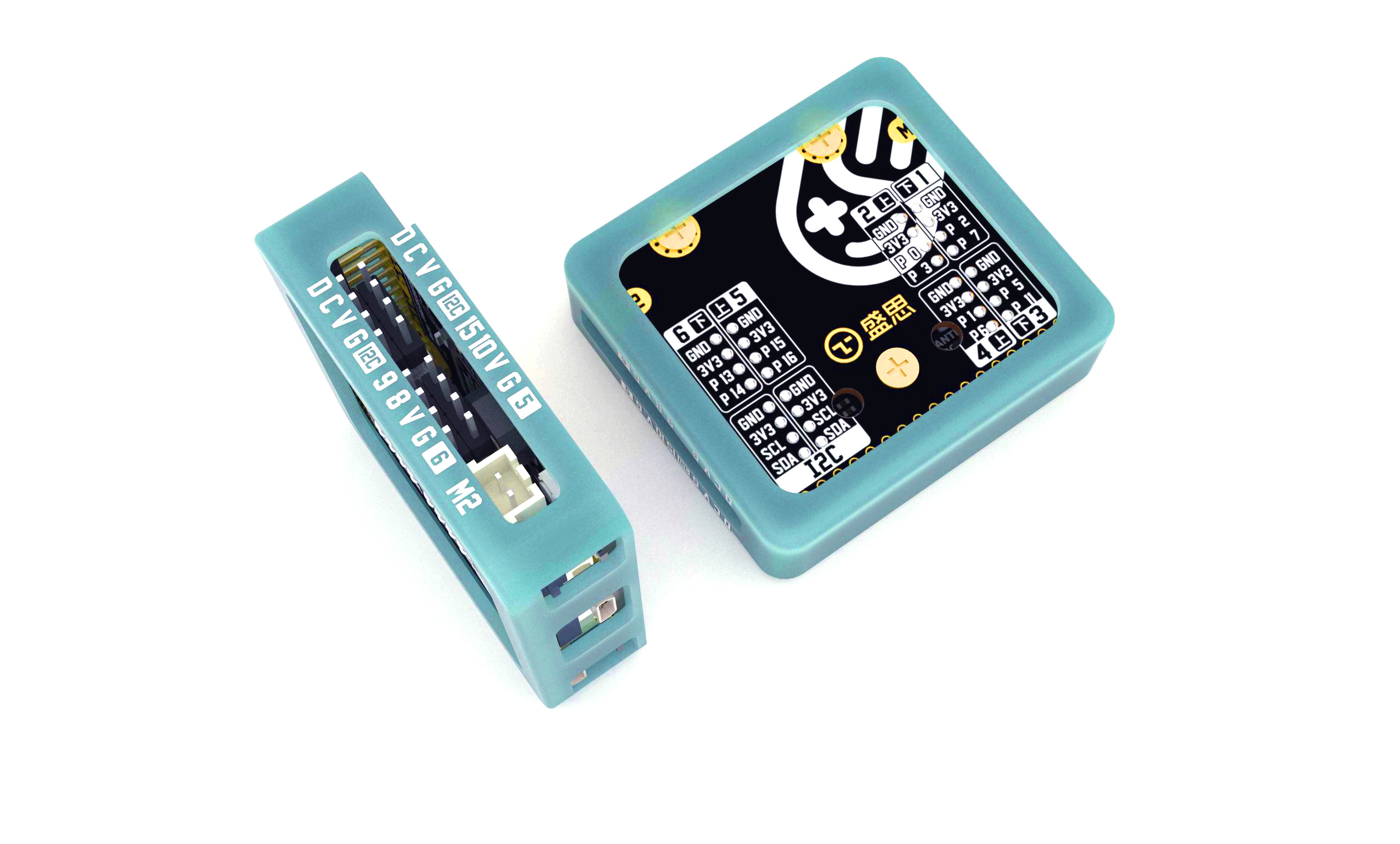
掌控拓展板parrot是mPython掌控板衍生的一款体积小巧、易于携带。支持电机驱动、语音播放、语音合成等功能的IO引脚扩展板,可扩展12路IO接口和2路I2C接口。 该库为掌控拓展板提供电机驱动,LED驱动等功能。
电机控制I2C通讯协议数据格式:
Type |
Command |
motor_no |
speed(int) |
控制电机 |
0x01 |
0x01/0x02 |
-100~100 |
当 'speed' 为负值,反转;当为正值,正转。
- parrot.MOTOR_1 = 1
M1电机编号,0x01
- parrot.MOTOR_2 = 2
M2电机编号,0x02
- parrot.set_speed(motor_no, speed)
设置电机速度
- parrot.get_speed(motor_no)
返回电机速度
- parrot.led_on(no, brightness=50)
打开灯。电机接口,除了可以驱动电机,还能做灯的控制。
- parrot.get_battery_level()
获取拓展板的电压值。
- 返回:
返回电量,单位mV。
- class parrot.IR
红外收发管的抽象类,用于红外发射和学习。
- send(buff, repeat_en=0)
发送红外脉冲数据buff
- 参数:
buff (bytes) -- 可以是
IR_encode.encode_nec返回的buff。或,学习后的buff。repeat_en (init) -- 重复码。用于表示按键常按。当repeat_en为1时,会不断发送重复码,直至
stop_send停止发送。
- stop_send()
停止发送,当发送重复码后,使用该函数来停止发送。
- learn(wait=True)
红外学习。默认下wait为True,此时为阻塞函数。learn()开始后,须在5秒内,常按住被学习对象按键。当学习完成后,会返回学习结果,成功True,失败Fail。wait 为 False,则为非阻塞,此时不返回结果。
- 参数:
wait (bool) -- 是否阻塞。
- 返回:
bool类型,返回结果
- get_learn_data()
返回学习后的,红外编码数据。该函数须在
learn函数后使用。- 返回:
返回编码后的红外脉冲数据buff
电机驱动示例
 1import parrot
 2from mpython import sleep_ms,sleep
 3
 4# 可设置速度范围为-100到100。
 5# 当值为正值时,电机正转;为负值时,电机反转;
 6
 7
 8while True:
 9
10    # 设置正转速度100
11    parrot.set_speed(parrot.MOTOR_1,100)
12    parrot.set_speed(parrot.MOTOR_2,100)
13    print("current motor speend: %d,%d" %(parrot.get_speed(parrot.MOTOR_1),parrot.get_speed(parrot.MOTOR_2)))    #获取电机速度
14    sleep(5)
15    # 设置反转速度100
16    parrot.set_speed(parrot.MOTOR_1,-100)
17    parrot.set_speed(parrot.MOTOR_2,-100)
18    print("current motor speend: %d,%d" %(parrot.get_speed(parrot.MOTOR_1),parrot.get_speed(parrot.MOTOR_2)))    #获取电机速度
19    sleep(5)
20    # 停止
21    parrot.set_speed(parrot.MOTOR_1,0)
22    parrot.set_speed(parrot.MOTOR_2,0)
23    print("current motor speend: %d,%d" %(parrot.get_speed(parrot.MOTOR_1),parrot.get_speed(parrot.MOTOR_2)))    #获取电机速度
24    sleep(2)
NEC编码红外发码示例
 1import parrot
 2import time
 3
 4ir_code = parrot.IR_encode()
 5
 6ir = parrot.IR()
 7ir_buff = ir_code.encode_nec(1, 85)
 8while True:
 9    ir.send(ir_buff, 1)
10    time.sleep(3)
11    ir.stop_send()
12    time.sleep(3)
NEC编码红外学习示例
 1from mpython import *
 2import parrot
 3import time
 4
 5def on_button_a_pressed(_):
 6    global data
 7    ir.learn()
 8    time.sleep(4)
 9    if 0 == ir.__get_learn_status():
10        data = ir.get_learn_data()
11        print(data)
12    else:
13        print('什么都没学到...')
14
15button_a.event_pressed = on_button_a_pressed
16
17def on_button_b_pressed(_):
18    global data
19    print(data)
20    ir.send(data, 0)
21
22button_b.event_pressed = on_button_b_pressed
23
24ir = parrot.IR()
25data = None